A freelancer's month, logged and invoiced in a few clicks
Fill the month with your default hours, adjust the exceptions and invoice the month from the timesheet. Time tracking and projects are part of the Solo plan.
The problem
A freelancer working full time for one or two clients logs the same eight hours almost every day. Typing them in one by one is tedious, and forgetting a day means billing less than was worked.
How Doktally solves it
- Fill the month: one action logs the default hours on every working day on each client's default project. It skips days that already have time, days outside the project's dates, weekends and Bulgarian public holidays.
- Change only the exceptions: a half day, a day off, an extra Saturday, with the form, a timer or quick set.
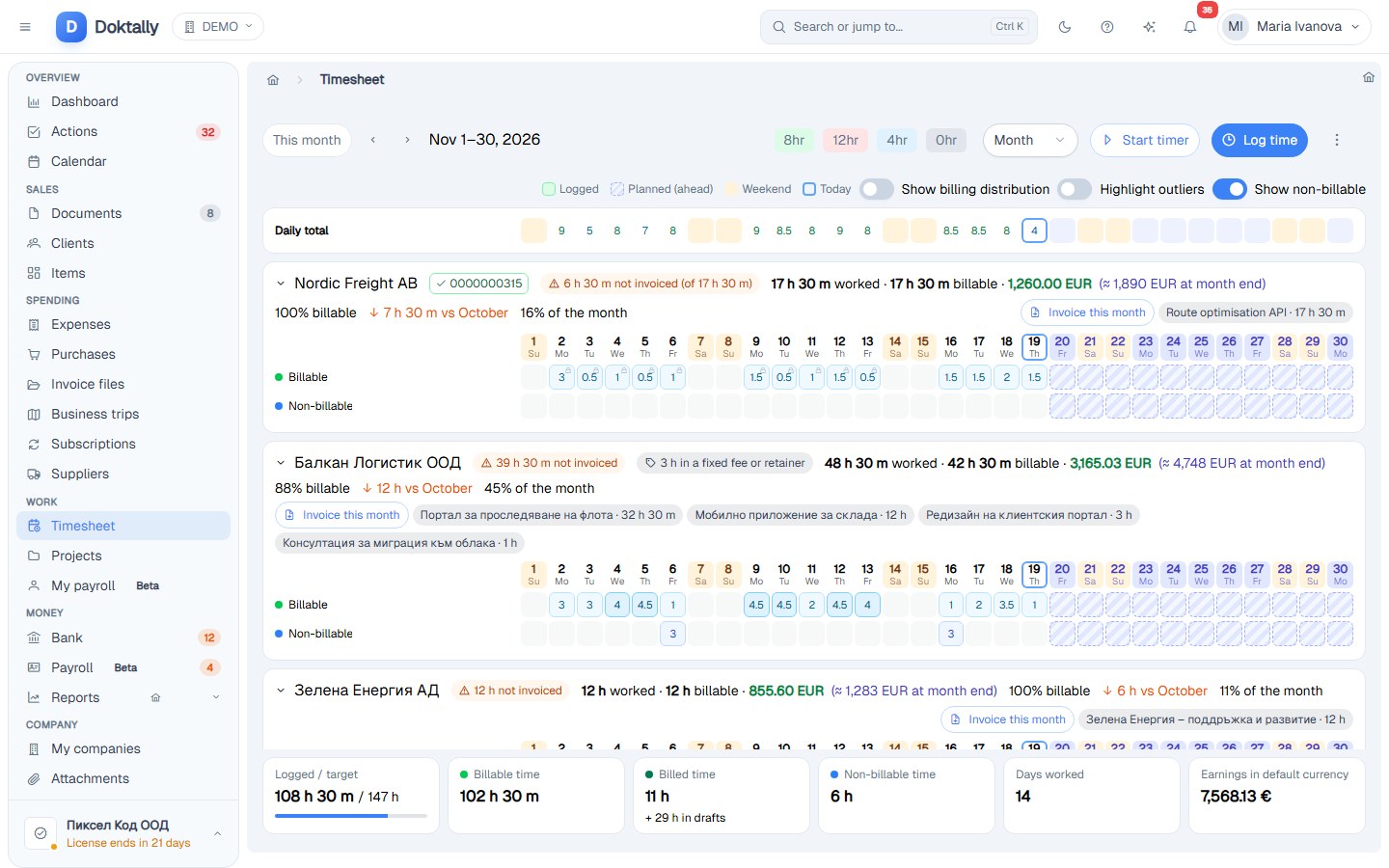
- The month at a glance: logged against the month's target, billable share, earnings so far and a projection to the month's end, and per client what is not invoiced yet, on a draft or invoiced.
- Invoice the month straight from the timesheet; each line explains how it was calculated, and the time on an issued invoice is locked.
- In the Solo plan: time tracking and projects are included for one-person businesses; contracts, work orders and dashboards come with Team.
The result
The month is logged in a minute, nothing worked goes unbilled, and the invoice is one click away from the timesheet.
Technologies
Time tracking, Freelancers, Angular
- Published: 2026-11-19
- Project: Doktally — Invoicing, time billing and VAT for small businesses
- Case study